
01 / Start
Quickstart
Create a key, set two environment variables, and send a verified first request.
- Create a workspace account and choose a plan.
- Create an API key with the smallest processing scope your service needs. Copy the secret immediately; it is not shown again.
- Set SCANVERION_API_URL and SCANVERION_API_KEY only in your server environment.
- Send a multipart request and persist the returned requestId with your own trace identifier.
curl --request POST "$SCANVERION_API_URL/api/v1/ai/document-processing"   --header "Authorization: Bearer $SCANVERION_API_KEY" \
  --header "Idempotency-Key: invoice-20260807-001"   --form "File=@invoice.pdf;type=application/pdf"   --form "Operations=Scanner" \
  --form "Operations=Rotation"   --form "ScannerFields=invoiceNumber"   --form "ScannerFields=issueDate"   --form "ScannerFields=dueDate"   --form "ScannerFields=paymentReference"   --form "ScannerFields=supplierIban"   --form "ScannerFields=customerIban"   --form "ScannerFields=supplierAddress"   --form "ScannerFields=supplierStreetName"   --form "ScannerFields=supplierStreetNumber"   --form "ScannerFields=supplierPostalCode"   --form "ScannerFields=supplierCity"   --form "ScannerFields=customerAddress"   --form "ScannerFields=supplierVatNumber"   --form "ScannerFields=customerVatNumber"   --form "ScannerFields=netTotal"   --form "ScannerFields=vatTotal"   --form "ScannerFields=vatBreakdown"   --form "ScannerFields=lineItems"   --form "ScannerFields=grossTotal"
02 / Security
Authentication and API keys
Use scoped machine credentials safely from a trusted backend.
03 / Reliability
Idempotency and retries
Give every processing attempt a stable key and handle duplicates deliberately.
Send an Idempotency-Key with each processing request. Reuse the same value only when retrying the same logical upload and requested operations. A duplicate reservation returns 409 Conflict; switching to a new key can create a second billable attempt.
04 / AI endpoint
Document processing
Upload JPEG, PNG, WebP, or PDF input for synchronous document analysis.
Use the exact ASP.NET multipart field names: one File, one or more repeated Operations, optional repeated ScannerFields, optional CheckboxDefinitions JSON, and optional DisableObjectSegmentation.
Scanner fields by document type
Use the canonical field keys below in repeated ScannerFields values. Matching is case-insensitive, but canonical spelling keeps integrations consistent. Every category also supports the common fields. A requested field can be null when OCR evidence is insufficient.
| Document type | Detected category | Additional ScannerFields |
|---|---|---|
| Every document | * | rawTextdocumentType |
| Invoice | invoice | invoiceNumberissueDatedueDatedeliveryDatepaymentReferencecurrencysupplierNamesupplierAddresssupplierStreetNamesupplierStreetNumbersupplierCitysupplierCityPartsupplierPostalCodesupplierCountryCodesupplierCompanyRegistrationNumbersupplierTaxNumbersupplierVatNumbersupplierIbansupplierBiccustomerNamecustomerAddresscustomerStreetNamecustomerStreetNumbercustomerCitycustomerCityPartcustomerPostalCodecustomerCountryCodecustomerCompanyRegistrationNumbercustomerTaxNumbercustomerVatNumbercustomerIbancustomerBicdeliveryNamedeliveryAddressdeliveryStreetNamedeliveryStreetNumberdeliveryCitydeliveryCityPartdeliveryPostalCodedeliveryCountryCodenetTotalvatTotalvatBreakdowngrossTotallineItemsbankAccounts |
| Passport | passport | documentNumberdateOfBirthsexnationalitynationalityNamepersonalNumberdateOfIssuedateOfExpiryissuedByplaceOfBirth |
| EU identity card, front | euidfront | documentNumberdateOfBirthsexnationalitynationalityNamepersonalNumberdateOfIssuedateOfExpiryissuedByplaceOfBirth |
| EU identity card, back | euidback | addressstreetNamestreetNumbercitycityPartpostalCodecountryCodemaidenNameplaceOfBirthbloodTypepersonalNumbermaritalStatusissuedBydocumentNumbernationalitynationalityNamedateOfBirthsexdateOfExpiry |
| EU driving licence, front | eudriverlicensefront | dateOfBirthplaceOfBirthdateOfIssuedateOfExpiryissuedBydocumentNumberlicenseAllowedCategories |
| Vehicle registration certificate, part I, front | eutechnicallicensefront | vinlicensePlateaddressownerdocumentNumber |
| Vehicle registration certificate, part I, back | eutechnicallicenseback | vinmanufacturervariantmodelvalidUntilvehicleCategoryengineVolumeenginePerformancefuelTypenumberOfSeatsmaximumSpeedlargestWeightKg |
| Vehicle registration certificate, part II, front | bigtechnicallicensefront | registrationCertificatePartdocumentNumberlicensePlatedateOfFirstRegistrationvinvehicleKindvehicleCategorymanufacturermodeltypeVariantVersionvehicleManufacturertypeApprovalNumbertypeApprovalDateengineManufacturerengineTypeengineVolumeCm3catalystenginePerformanceKwengineSpeedRpmfuelTypetransmission |
| Vehicle registration certificate, part II, back | bigtechnicallicenseback | bodyTypecolorproductionNumbernumberOfSeatsnumberOfStandingPlacesnumberOfBedsroofLoadKgfuelTankVolumeLlengthMmwidthMmheightMmoperationalWeightKgmaximumWeightKgmaximumBrakedTrailerWeightKgmaximumUnbrakedTrailerWeightKgnumberOfAxleswheelbaseMmfrontTyresrearTyresfrontRimsrearRimsmaximumSpeedKphstationaryNoiseDbdriveByNoiseDbemissionStandardco2GKmfuelConsumptionL100Km |
| Residence permit, front | residencepermitfront | documentNumbersexnationalitynationalityNamedateOfBirthpersonalNumbertypeOfPermitdateOfExpirynotescardAccessNumber |
| Residence permit, back | residencepermitback | documentNumbersexnationalitynationalityNamedateOfBirthdateOfExpirydateOfIssueissuedByplaceOfBirthaddresspersonalNumbercountryCode |
| Disability card | disabilitycard | dateOfBirthdateOfIssuedocumentNumberissuedByaddress |
| Full image or unrecognized document | fullimage / other | - |
Supported documents
See what Scanverion can read.
Clearly invalid AI specimens are based on linked public document layouts. The cards distinguish an API category from the structured Scanner output that has been implemented and tested.
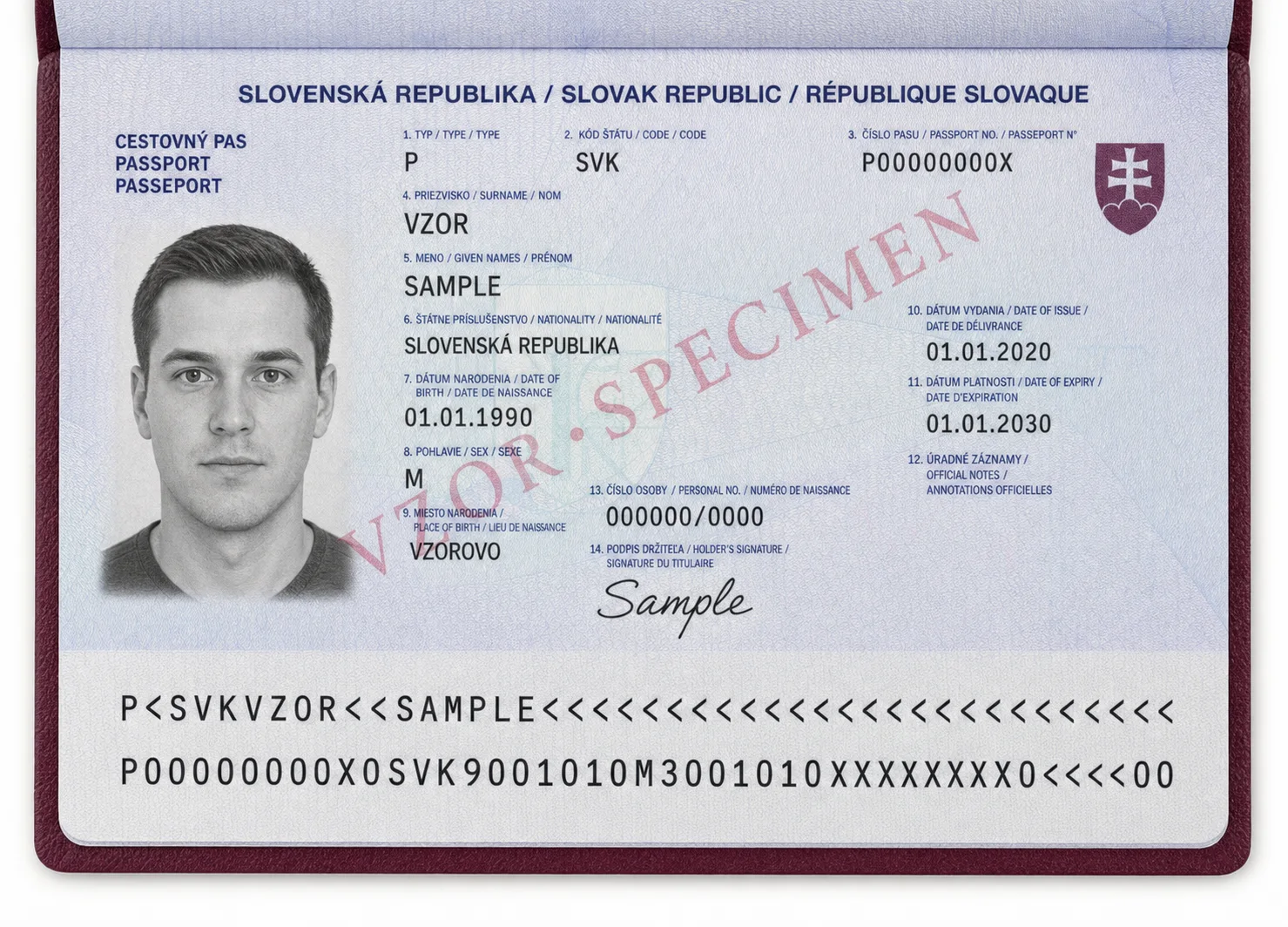
Passport
Universal ICAO TD3 MRZ plus selected printed layouts
Example fields
Passport
namedocumentNumbernationalityNamedateOfBirthdateOfExpiryplaceOfBirth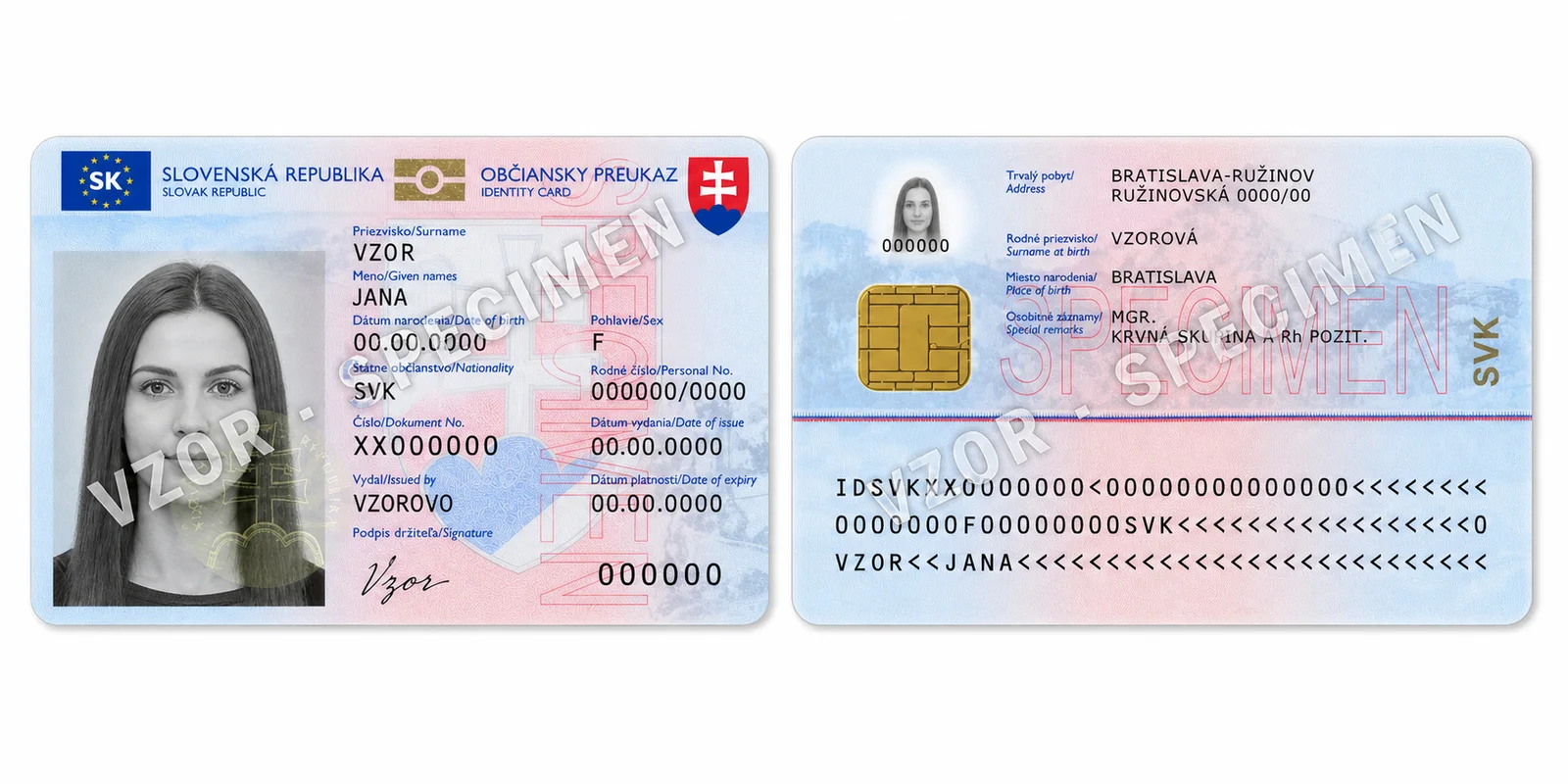
EU identity card
Country-specific front and back extraction
Example fields
EUIdFrontEUIdBack
namedocumentNumberpersonalNumbernationalityNameaddressdateOfExpiry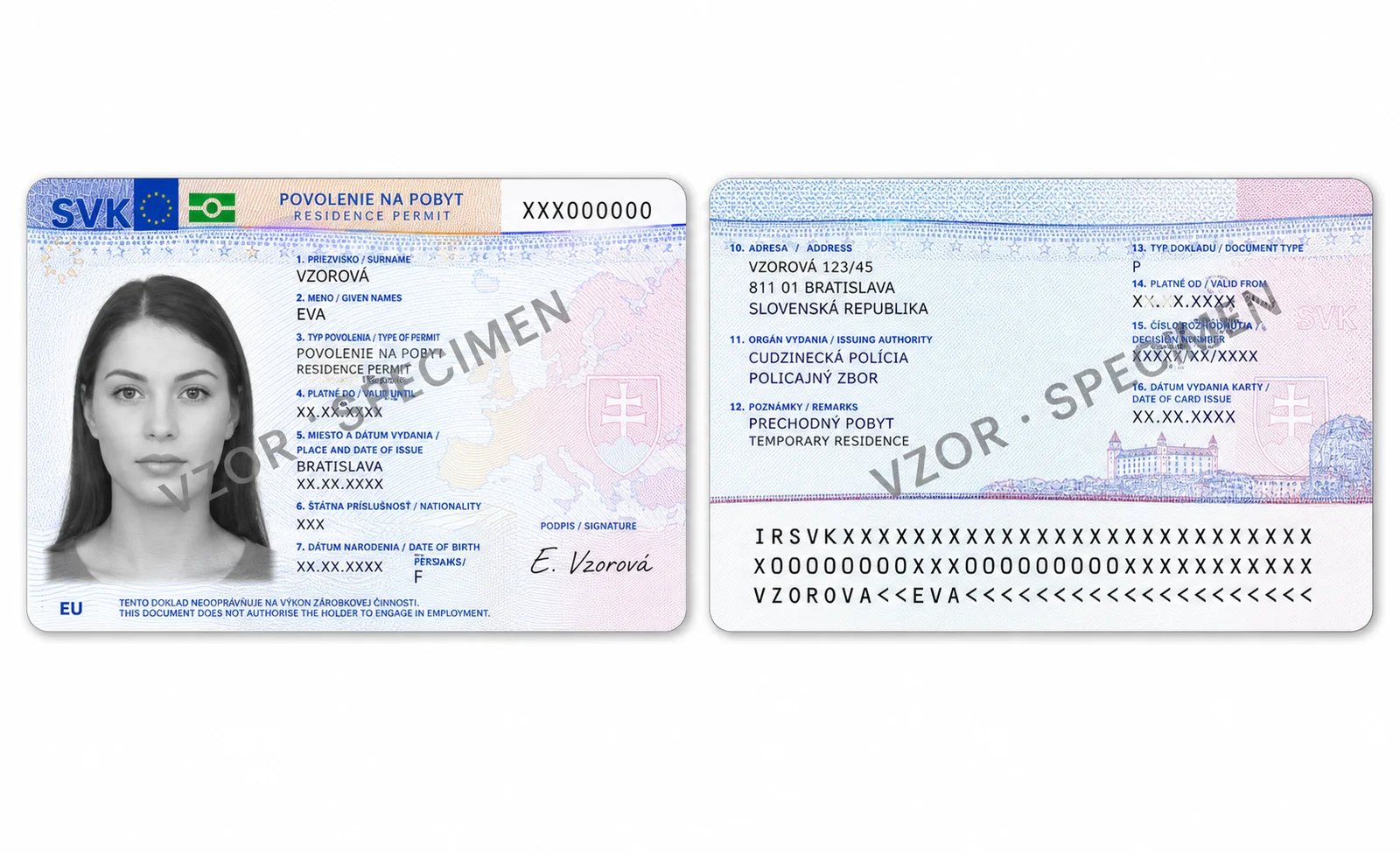
Residence permit
Slovak front and back layouts
Example fields
ResidencePermitFrontResidencePermitBack
namedocumentNumbertypeOfPermitnationalityNameaddressissuedBy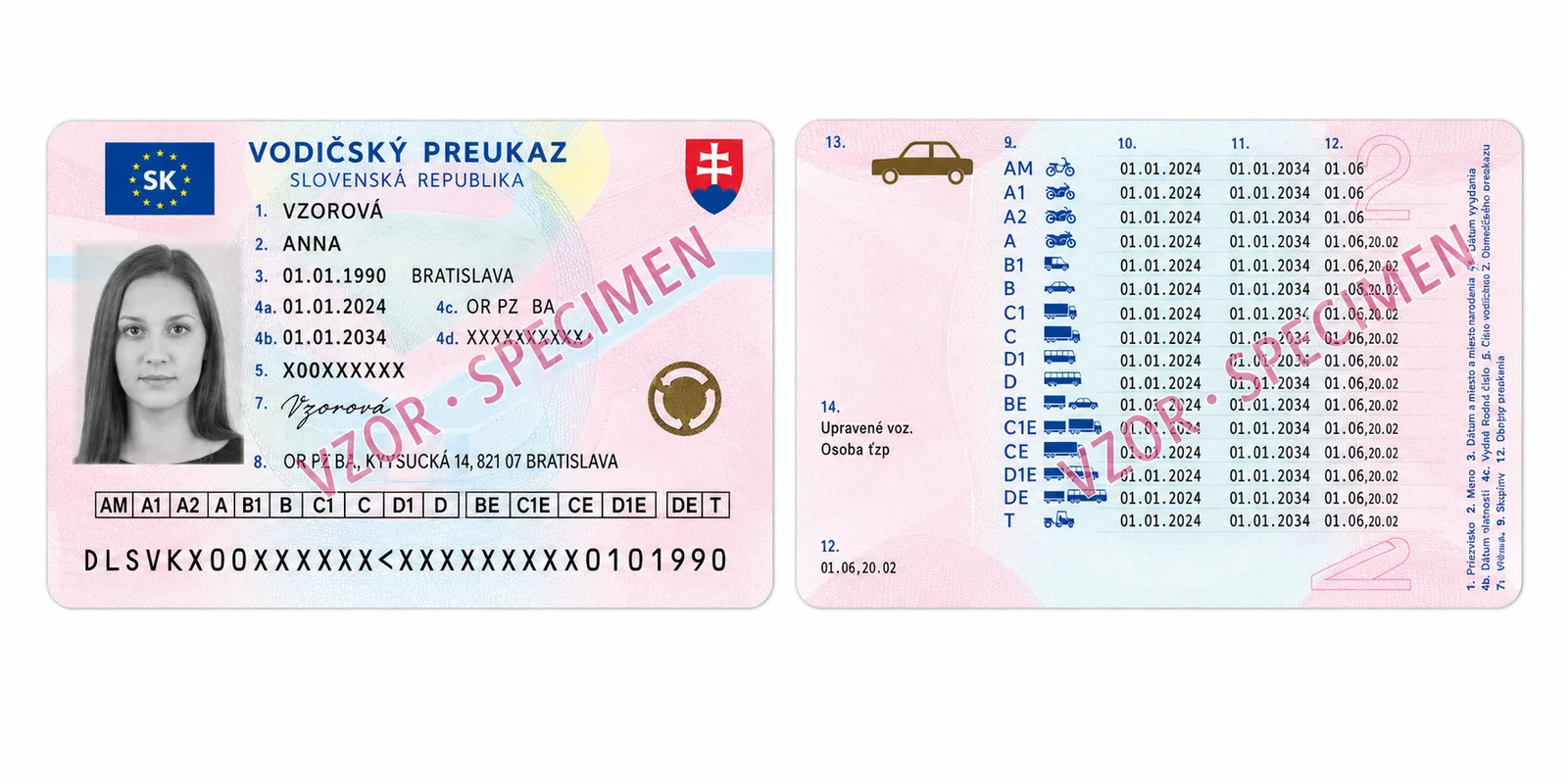
EU driving licence
Slovak front layout
Example fields
EUDriverLicenseFront
namedocumentNumberdateOfIssuedateOfExpiryissuedBylicenseAllowedCategories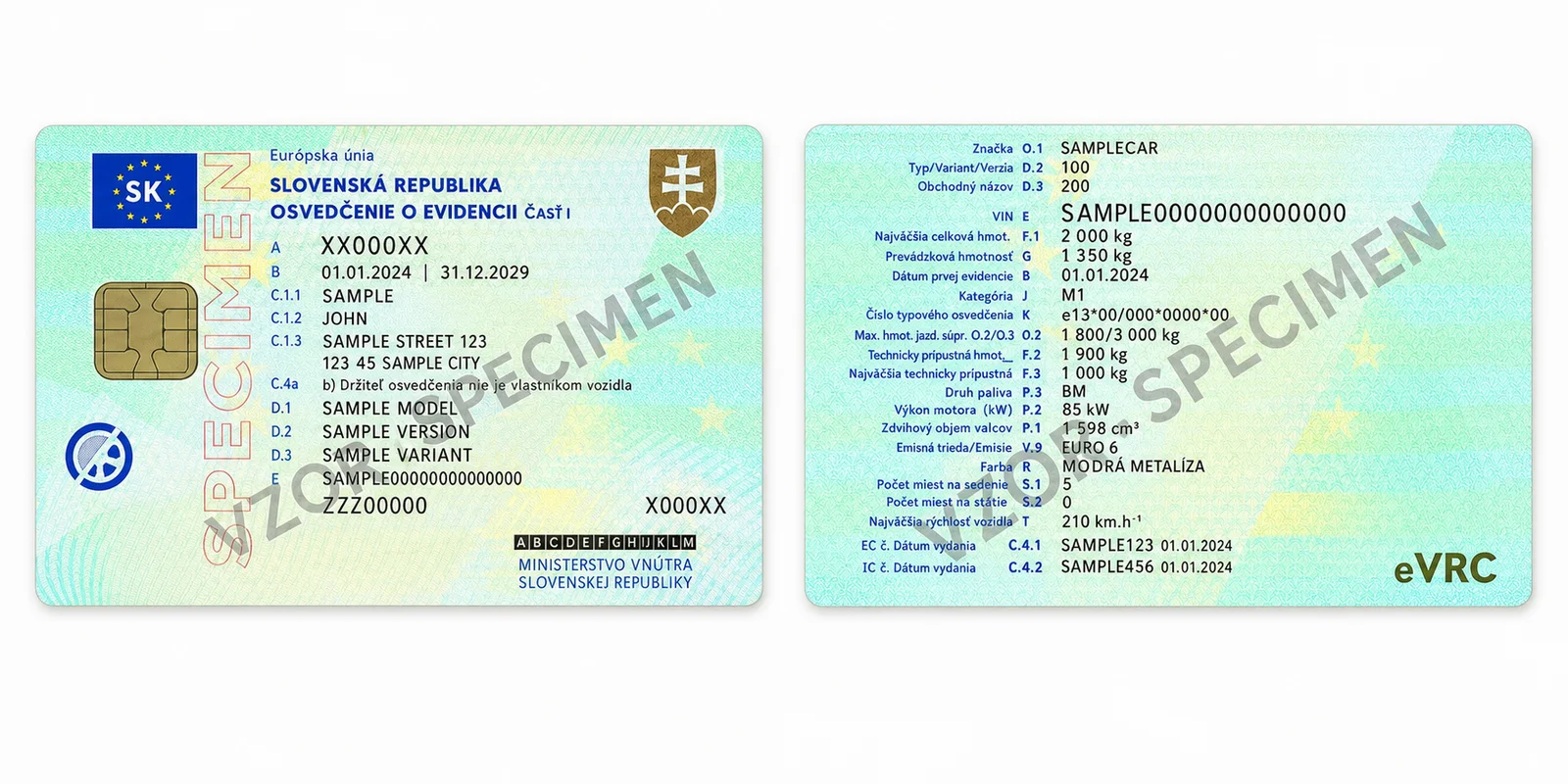
Small technical certificate · Part I
Slovak plastic-card Part I, front and back
Example fields
EUTechnicalLicenseFrontEUTechnicalLicenseBack
documentNumbervinlicensePlatemanufacturermodelfuelType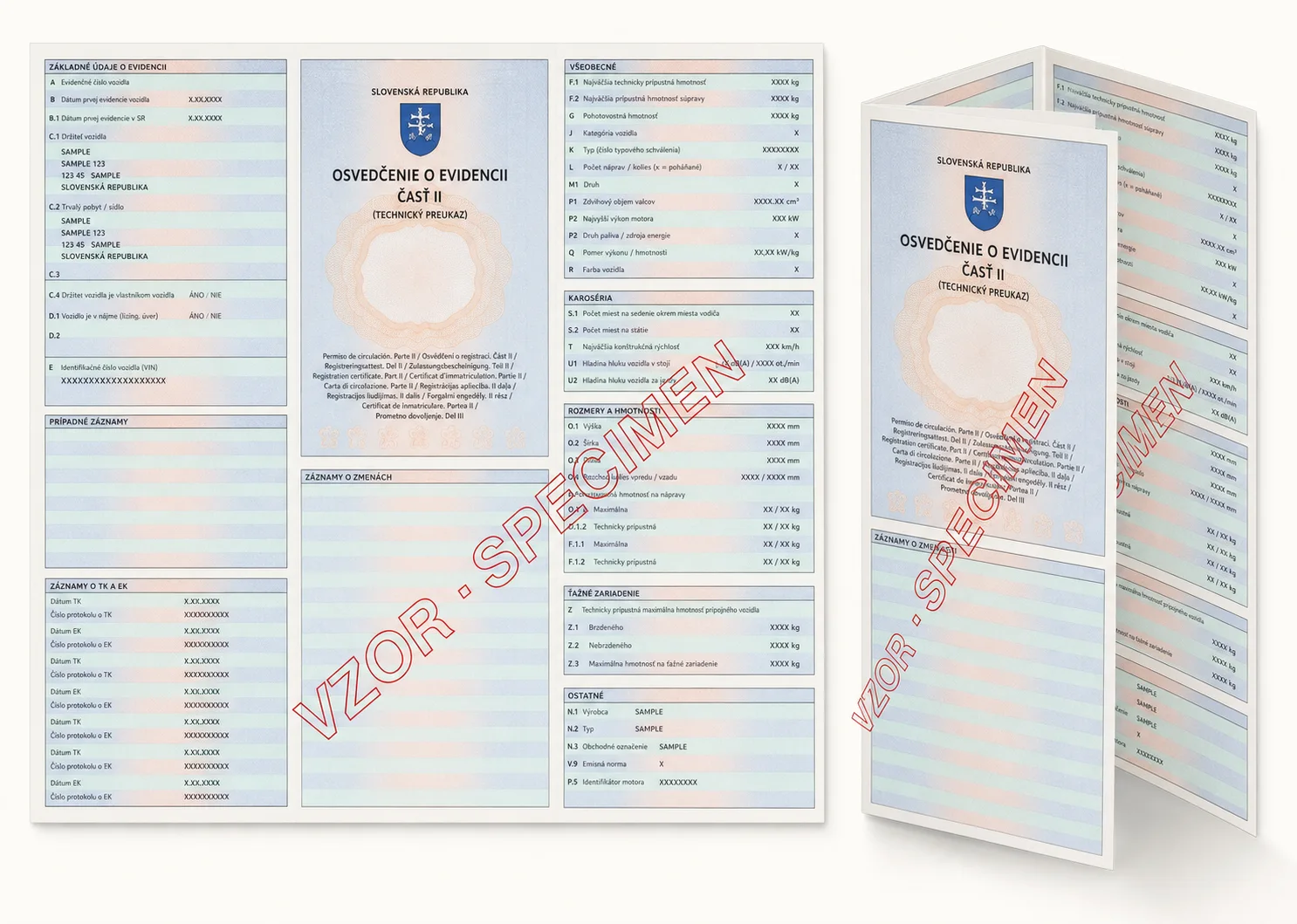
Large technical certificate · Part II
Slovak folded-paper Part II, front and back
Example fields
BigTechnicalLicenseFrontBigTechnicalLicenseBackEUTechnicalLicensePartII
documentNumbervinlicensePlatevehicleCategoryenginePerformanceKwmaximumWeightKg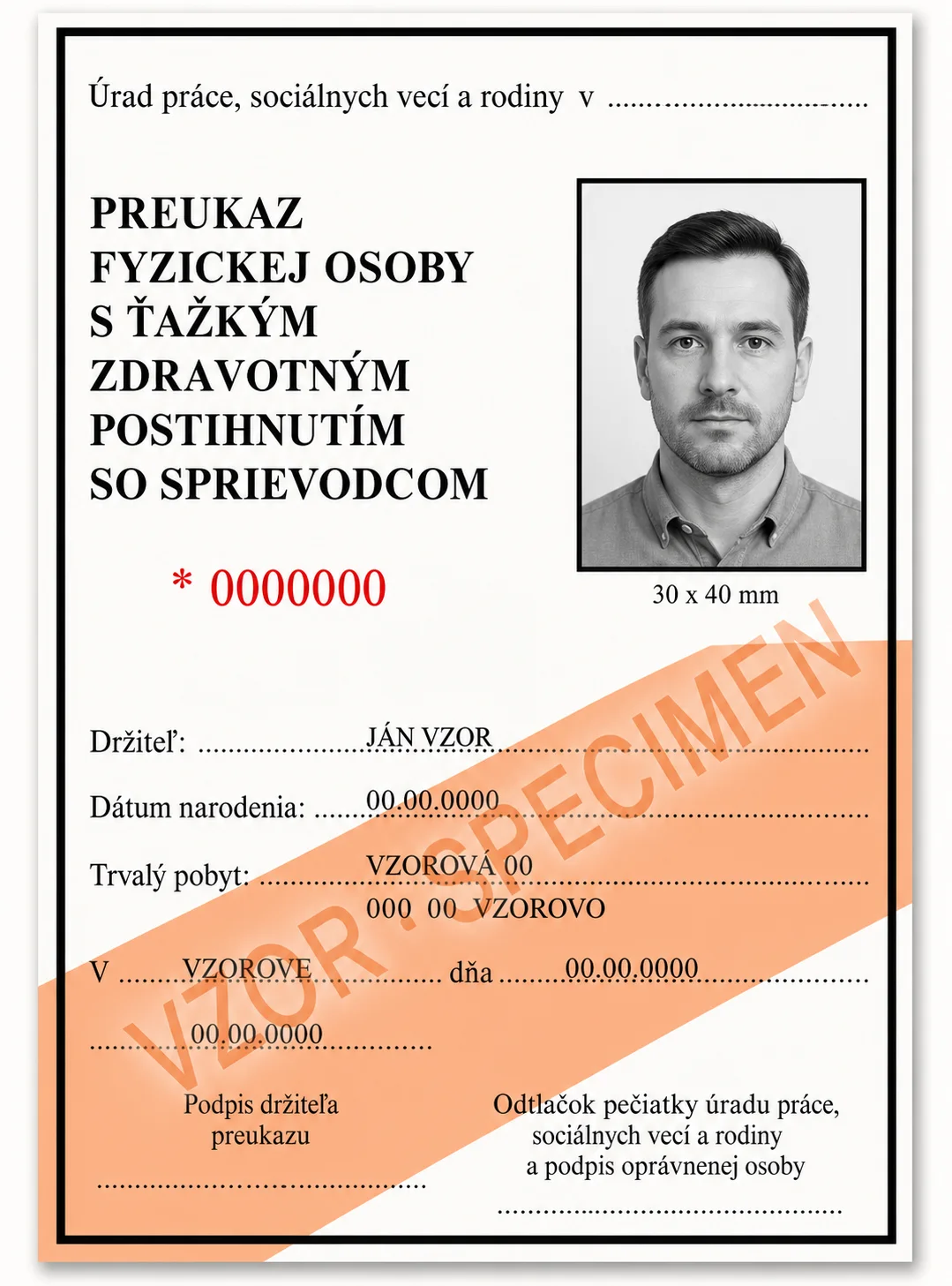
Disability card
Slovak card layouts
Example fields
DisabilityCard
namedocumentNumberdateOfBirthdateOfIssueissuedByaddress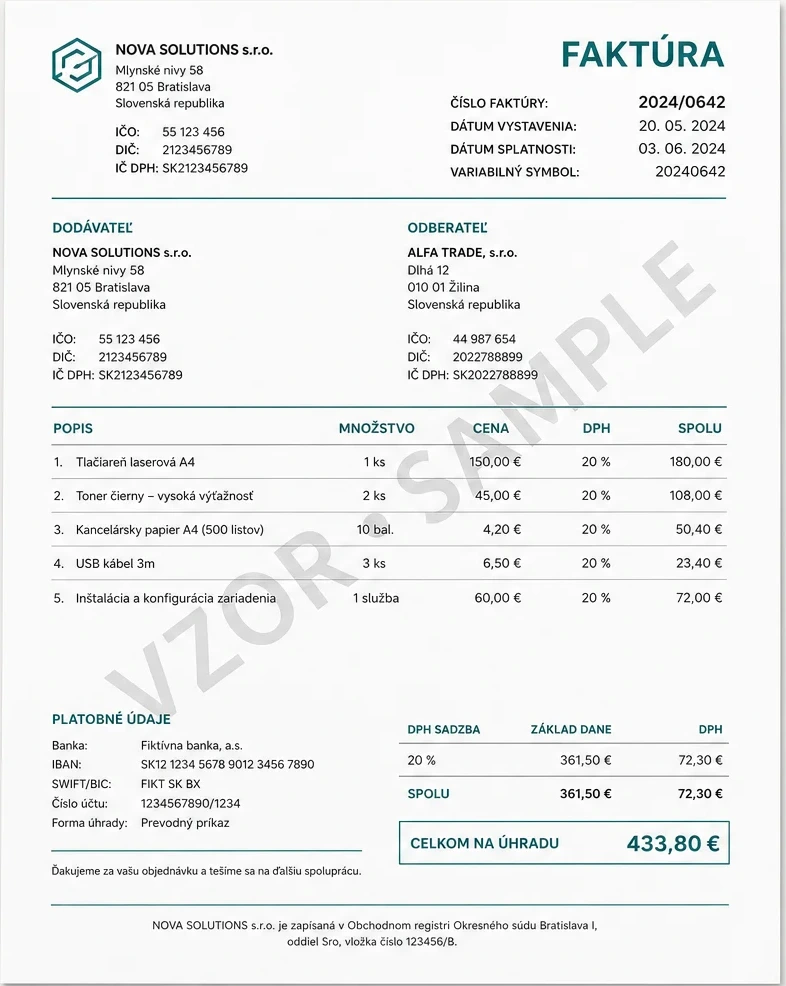
Invoice
Layout-based invoice extraction
Example fields
Invoice
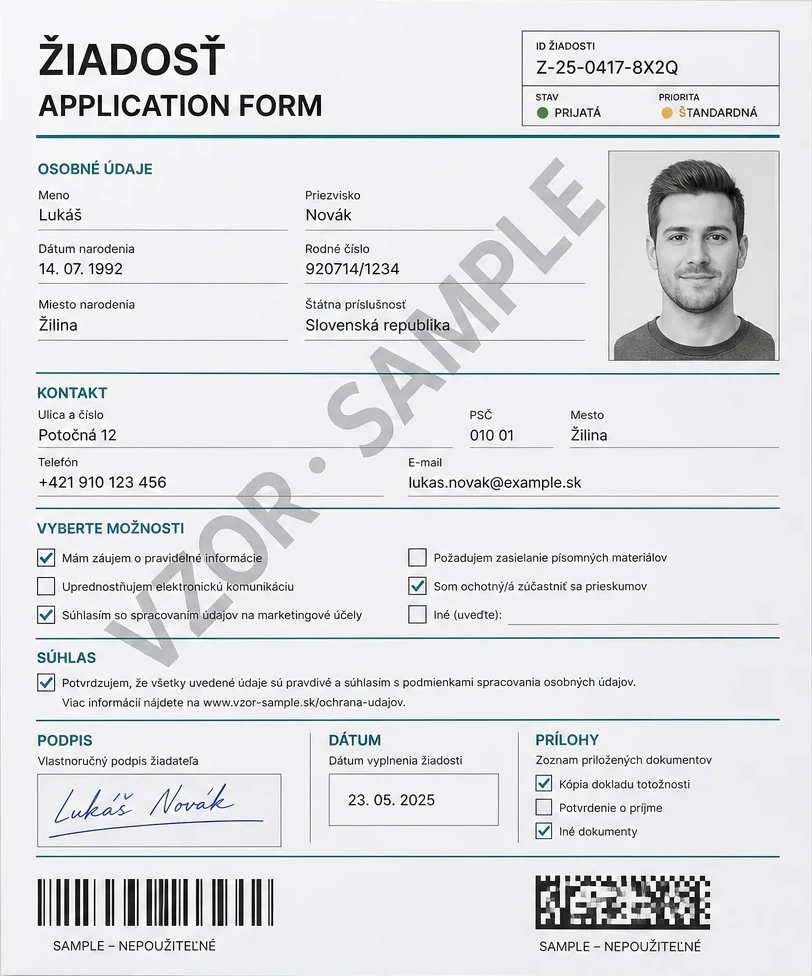
invoiceNumbersupplierNamecustomerNamepaymentReferencelineItemsgrossTotalAI-generated demo images use fictional data, visible SPECIMEN markings and invalid machine-readable values. They are not real or customer documents.
Generic documents
Visual operations work beyond known document types.
Checkboxes, barcodes, signatures, faces, blur and rotation can be analysed on forms, contracts, scans and unknown documents. A dedicated Scanner profile is not required.
Detection: Locate documents and other objects.Rotation: Measure document orientation.Blur: Evaluate image sharpness.BarcodeReading: Read QR and linear barcodes.CheckboxDetection: Evaluate checkbox regions supplied in the request.SignatureDetection: Detect a visible signature.FaceDetection: Locate visible faces.FaceExtraction: Return detected face regions.
Example fields
CheckboxDetection uses CheckboxDefinitions supplied with the request. Full-image scanning can also return requested ScannerFields.
Layout reference: Original Scanverion AI application form · Fictional demoCountry support
Coverage follows the document standard and issuing layout.
Passport MRZ data is standardized globally. Identity cards and other national documents require a tested layout for that country and document generation.
Passports
MRZ fields from any passport with a readable ICAO TD3 MRZThe MRZ provides names, document number, dates, sex and nationality. Additional printed fields depend on the national layout.
National identity cards
Structured fields for supported front and back layoutsFront and back coverage varies by country and card generation.
Slovak national documents
Structured fields for the supported Slovak document typesThe holder's nationality does not change the issuing-country layout.
05 / AI endpoint
Vehicle processing
Run detection or blur analysis against a vehicle image.
The request shape matches document processing, but vehicle requests accept only Detection and Blur. Unsupported operation combinations return 422 Unprocessable Entity.
06 / Multiple files
Batch processing
Process multiple document or vehicle files in one synchronous request.
Repeat the Files field for every upload. Files are processed sequentially, each result remains identifiable in the batch response, and usage is combined for the full request.
curl --request POST "$SCANVERION_API_URL/api/v1/ai/document-processing/batches" \
  --header "Authorization: Bearer $SCANVERION_API_KEY" \
  --header "Idempotency-Key: onboarding-batch-42" \
  --form "Files=@front.jpg;type=image/jpeg" \
  --form "Files=@back.jpg;type=image/jpeg" \
  --form "Operations=Scanner"
Processing endpoint directory
| Method | Path | File field | Contract |
|---|---|---|---|
POST | /api/v1/ai/document-processing | File | JPEG, PNG, WebP, or PDF; maximum 10 MB |
POST | /api/v1/ai/vehicle-processing | File | JPEG, PNG, or WebP; Detection and Blur only |
POST | /api/v1/ai/document-processing/batches | Files | Multiple files; results remain grouped by file |
POST | /api/v1/ai/vehicle-processing/batches | Files | Multiple vehicle images; Detection and Blur only |
POST | /api/v1/signature-comparisons | Candidate + References | One candidate, 3 to 5 references; exactly 1 credit on success |
POST | /api/v1/face-comparisons | ReferenceImage / ReferenceArtifactId + CandidateImage / CandidateArtifactId | Exactly one JPEG/PNG image or artifact per side; images up to 10 MB. Policy: balanced. An Idempotency-Key is required. |
GET | /api/v1/ai/capabilities | - | Supported MIME types, operations, and maximum file size |
Signature comparison
Compare one candidate signature with three to five known references. The result measures visual similarity under the selected policy; it does not verify authenticity, identity, or authorship.
Send Candidate once, repeat References three to five times, and set Mode to strict, balanced, or similarity. Each image must be JPEG, PNG, or WebP and no larger than 10 MB.
curl --request POST "$SCANVERION_API_URL/api/v1/signature-comparisons" \
  --header "Authorization: Bearer $SCANVERION_API_KEY" \
  --header "Idempotency-Key: signature-comparison-001" \
  --form "Candidate=@candidate.png;type=image/png" \
  --form "References=@reference-1.png;type=image/png" \
  --form "References=@reference-2.png;type=image/png" \
  --form "References=@reference-3.png;type=image/png" \
  --form "Mode=balanced"
The response reports isSimilar, the selected mode, distance, threshold, reference count, warnings, and charged credits. A non-match is a successful result, not an error.
{
  "requestId": "3be5d51e33d64c7699954e3e9f07ea54",
  "isSimilar": true,
  "result": "Similar",
  "mode": "balanced",
  "metric": "cosine-distance",
  "rawDistance": 0.027,
  "threshold": 0.045,
  "referenceCount": 3,
  "warnings": [],
  "credits": 1.0
}
Face comparison
Compare two authorized portraits without running document Detection or Scanner. Use uploaded images or portrait artifacts from the same workspace.
POST /api/v1/face-comparisonsReceive similarity, a decision, review reasons, normalized face bounds, and landmarks. Similarity is not an identity probability or proof of liveness.
Faces must be at least 80 × 80 pixels and cover 2% of the image. Up to four eligible faces per side are cross-referenced; the best pair is returned. Multiple eligible faces require manual review. Smaller faces are ignored.
Successful comparisons use the configured face-comparison credit price. Read the policy and usage response; validation and provider failures are not charged. Source images are processed transiently, not enrolled.
curl --request POST "$SCANVERION_API_URL/api/v1/face-comparisons" \
  --header "Authorization: Bearer $SCANVERION_API_KEY" \
  --header "Idempotency-Key: face-comparison-001" \
  --form "ReferenceImage=@reference.jpg;type=image/jpeg" \
  --form "CandidateImage=@candidate.png;type=image/png" \
--form "Policy=balanced"{
"requestId": "face-comparison-001",
"decision": "ManualReview",
"similarity": 88.4,
"policy": "balanced",
"reviewRequired": true,
"reasons": [
"multiple_eligible_faces_best_pair"
],
"providerModel": "model-version",
"credits": 2,
"referenceFace": {
"bounds": {
"left": 0.12,
"top": 0.18,
"width": 0.4,
"height": 0.5
},
"landmarks": [
{
"type": "eyeLeft",
"x": 0.24,
"y": 0.33
}
]
},
"candidateFace": {
"bounds": {
"left": 0.2,
"top": 0.12,
"width": 0.38,
"height": 0.48
},
"landmarks": [
{
"type": "eyeLeft",
"x": 0.3,
"y": 0.27
}
]
}
}import { readFile } from "node:fs/promises";
import { randomUUID } from "node:crypto";
import { Scanverion } from "@scanverion/sdk";
const client = new Scanverion({
apiKey: process.env.SCANVERION_API_KEY ?? "",
baseUrl: "https://api.scanverion.com",
});
const result = await client.faces.compare({
reference: { image: await readFile("reference.jpg"), contentType: "image/jpeg" },
candidate: { artifactId: "workspace-portrait-id" },
idempotencyKey: randomUUID(),
});import os
from pathlib import Path
from uuid import uuid4
from scanverion import Scanverion, FaceComparisonInput
client = Scanverion(api_key=os.environ["SCANVERION_API_KEY"],
base_url="https://api.scanverion.com")
result = client.faces.compare(
FaceComparisonInput(image=Path("reference.jpg")),
FaceComparisonInput(artifact_id="workspace-portrait-id"),
idempotency_key=str(uuid4()),
)using Scanverion;
using var client = new ScanverionClient(
Environment.GetEnvironmentVariable("SCANVERION_API_KEY")!,
baseUri: new Uri("https://api.scanverion.com"));
await using var reference = File.OpenRead("reference.jpg");
var result = await client.Faces.CompareAsync(
new FaceComparisonInput(reference, "reference.jpg", "image/jpeg"),
new FaceComparisonInput(ArtifactId: "workspace-portrait-id"),
Guid.NewGuid().ToString());scanverion face compare reference.jpg candidate.png --idempotency-key face-comparison-001 --output json{
"reference": { "imageBase64": "<JPEG base64>", "fileName": "reference.jpg", "contentType": "image/jpeg" },
"candidate": { "imageBase64": "<PNG base64>", "fileName": "candidate.png", "contentType": "image/png" },
"policy": "balanced",
"idempotencyKey": "face-comparison-001"
}Face templates and database search
Integrate reusable signed face templates, store one vector per person and search your own database with pgvector.
1. Create a reusable template
Send one to eight authorized JPEG/PNG photos of the same person as repeated Images parts. Each file can be up to 10 MiB, with 40 MiB in total. The server checks consistency and combines selected usable views into one normalized 128-dimensional vector. Use a fresh idempotency key for each new operation; keep the same key for the same attempt.
export SCANVERION_TEMPLATE_URL="https://api.scanverion.com/api/v1/identity-templates"

curl --request POST "$SCANVERION_TEMPLATE_URL/workspace" \
  --header "Authorization: Bearer $SCANVERION_WORKSPACE_TOKEN" \
  --header "Idempotency-Key: template-enroll-person-001" \
  --form "ProcessingAuthorized=true" \
  --form "Images=@portrait.jpg;type=image/jpeg"
The response contains templateToken, expiresAt and searchIndex. The vector is Base64-encoded little-endian float32, not a text value to compare. Keep the complete signed token, vector and returned version identifiers together. Example placeholders are not usable biometric data.
{
  "templateToken": "<signed template token>",
  "expiresAt": "<ISO 8601 expiry>",
  "searchIndex": {
    "formatVersion": "identity-template-search-v2",
    "compatibilityVersion": "<returned representation version>",
    "dimensions": 128,
    "encoding": "float32-le-base64",
    "metric": "cosine",
    "aggregationVersion": "normalized-weighted-centroid-cosine-v1",
    "selectionVersion": "<returned selection version>",
    "vector": "<Base64 float32 vector>"
  }
}
2. Store one vector per person
Decode searchIndex.vector on your backend, validate the supported format and returned versions, and atomically store it with your own person ID, token and expiry. The following consumer-owned PostgreSQL schema uses pgvector and HNSW. It is an integration example, not an application migration. Authorize the workspace independently; query filters alone are not access control.
function decodeSearchVector(index: {
  formatVersion: string; dimensions: number; encoding: string;
  metric: string; aggregationVersion: string; vector: string;
}): number[] {
  if (index.formatVersion !== "identity-template-search-v2" ||
      index.dimensions !== 128 || index.encoding !== "float32-le-base64" ||
      index.metric !== "cosine" ||
      index.aggregationVersion !== "normalized-weighted-centroid-cosine-v1")
    throw new Error("Unsupported search index");
  if (index.vector.length !== 684) throw new Error("Invalid vector size");
  const bytes = Buffer.from(index.vector, "base64");
  try {
    if (bytes.length !== 512 || bytes.toString("base64") !== index.vector)
      throw new Error("Invalid vector encoding");
    const vector: number[] = [];
    for (let position = 0; position < 128; position++)
      vector.push(bytes.readFloatLE(position * 4));
    const norm = vector.reduce((sum, value) => sum + value * value, 0);
    if (!vector.every(Number.isFinite) || Math.abs(norm - 1) > 0.001)
      throw new Error("Invalid normalized vector");
    return vector;
  } finally { bytes.fill(0); }
}CREATE EXTENSION IF NOT EXISTS vector;
CREATE TABLE person_face_template (
workspace_id uuid NOT NULL,
person_id uuid NOT NULL,
template_token text NOT NULL,
expires_at timestamptz NOT NULL,
compatibility_version text NOT NULL,
selection_version text NOT NULL,
aggregation_version text NOT NULL,
face_vector vector(128) NOT NULL,
PRIMARY KEY (workspace_id, person_id)
);
CREATE INDEX person_face_template_cosine
ON person_face_template USING hnsw (face_vector vector_cosine_ops);3. Search with a new portrait
Create a probe through the same generation endpoint with one new authorized photo and a new idempotency key. Decode its vector, then bind these query parameters: $1 probe vector, $2 authorized workspace UUID, $3 compatibilityVersion, $4 selectionVersion, $5 aggregationVersion. A pgvector-aware driver can bind the decoded array. One probe extraction supplies the entire search; no API call per stored person is needed. Never concatenate user input into SQL.
SELECT person_id, 1 - (face_vector <=> $1::vector) AS similarity
FROM person_face_template
WHERE workspace_id = $2::uuid
  AND compatibility_version = $3
  AND selection_version = $4
  AND aggregation_version = $5
  AND expires_at > now()
ORDER BY face_vector <=> $1::vector
LIMIT 10;
4. Optionally validate a shortlisted pair
Send the stored token as ReferenceTemplate and the probe token as CandidateTemplate. Alternatively, replace CandidateTemplate with one CandidateImage JPEG/PNG part. The API verifies signatures, scope, expiry and compatibility. Both templates must belong to the same workspace. The response includes similarity, metric, reviewRequired, referenceViews and candidateViews. This is optional for database cosine search and remains a separate protected comparison request.
curl --request POST "$SCANVERION_TEMPLATE_URL/workspace/comparisons" \
  --header "Authorization: Bearer $SCANVERION_WORKSPACE_TOKEN" \
  --header "Idempotency-Key: template-compare-001" \
  --form "ProcessingAuthorized=true" \
  --form-string "ReferenceTemplate=$REFERENCE_TEMPLATE_TOKEN" \
  --form-string "CandidateTemplate=$PROBE_TEMPLATE_TOKEN"
5. Handle results and lifecycle safely
Nearest-neighbor search returns candidates even when nobody matches. Set a reviewed no-match threshold and human-review policy using representative data; similarity is not a probability, identity verification or liveness evidence. Approximate HNSW retrieval is not exhaustive and filters can reduce candidate counts. Keep workspaces and representation, aggregation and selection versions separate. Ten-calendar-year signature expiry depends on retained verification keys and compatible versioned processing, not guaranteed future accuracy. Protect templates as biometric data, never log them, and delete both token and vector when consent or retention ends. Signing and Base64 do not encrypt data. Only index trusted issuance responses; untrusted imports require trusted-key signature verification and exact projection agreement.
Handle failures explicitly: 400 invalid input; 401/403 authentication, authorization or missing consent; 402 workspace credits; 404 unavailable Development route; 409 duplicate idempotency key; 422 invalid/incompatible template, unusable face or inconsistent photos; 429 trial/burst limits; 503 unavailable processing or billing. Honor Retry-After where supplied and do not automatically resubmit photos. Anonymous trials use the route without /workspace, require BotVerificationToken, and have a separate template scope. Policy and response headers advertise limits and charged credits.
Liveness
A short camera session checks for presentation attacks. Face matching remains a separate assessment.
- 1Create on the backend
Obtain authorization and create one short-lived session.
- 2Capture in React
Pass the returned session to the Scanverion component.
- 3Read the assessment
Retrieve the assessment after the completion callback.
Install
React capture 0.1.0 is available on npm. Use backend SDK 0.1.1 or later for the liveness methods.
npm install react react-dom
  npm install @scanverion/sdk@0.1.1 @scanverion/liveness-react@0.1.0
Create on the backend
These are trusted server helpers, not public HTTP handlers. Your application must authenticate participants, verify processing authorization, bind sessions to their owner, and expose CSRF-protected routes. Keep session tokens in server-side storage when using a backend bridge. Pass the session and a result-loading callback to the React step below.
Backend SDKs: @scanverion/sdk for Node.js (npm, JavaScript/TypeScript), scanverion for Python (sync and async), and Scanverion.Sdk for .NET (NuGet). Use a build containing the liveness methods. A Java SDK/Maven package is not currently available; Java backends can use the REST API shown under Other clients.
import { randomUUID } from "node:crypto";
import { Scanverion } from "@scanverion/sdk";

const client = new Scanverion({
  apiKey: process.env.SCANVERION_API_KEY ?? "",
  baseUrl: "https://api.scanverion.com",
});

export async function createAuthorizedCapture() {
  return client.liveness.createSession({
    processingAuthorized: true,
    idempotencyKey: randomUUID(),
  });
}

export async function readOwnedAssessment(sessionId: string, accessToken: string) {
  return client.liveness.getResult({ sessionId, accessToken });
}import os
from uuid import uuid4
from scanverion import Scanverion
client = Scanverion(api_key=os.environ["SCANVERION_API_KEY"],
base_url="https://api.scanverion.com")
def create_authorized_capture():
return client.liveness.create_session(
processing_authorized=True, idempotency_key=str(uuid4()))
def read_owned_assessment(session_id, access_token):
return client.liveness.get_result(
session_id=session_id, access_token=access_token)import os
from uuid import uuid4
from scanverion import AsyncScanverion
def liveness_client():
return AsyncScanverion(api_key=os.environ["SCANVERION_API_KEY"],
base_url="https://api.scanverion.com")
async def create_authorized_capture():
async with liveness_client() as client:
return await client.liveness.create_session(
processing_authorized=True, idempotency_key=str(uuid4()))
async def read_owned_assessment(session_id, access_token):
async with liveness_client() as client:
return await client.liveness.get_result(
session_id=session_id, access_token=access_token)using Scanverion;
using var client = new ScanverionClient(
Environment.GetEnvironmentVariable("SCANVERION_API_KEY")!,
baseUri: new Uri("https://api.scanverion.com"));
Task<FaceLivenessSession?> CreateAuthorizedCapture() =>
client.Liveness.CreateSessionAsync(true, Guid.NewGuid().ToString());
Task<FaceLivenessResult?> ReadOwnedAssessment(string sessionId, string accessToken) =>
client.Liveness.GetResultAsync(sessionId, accessToken);Capture in React
"use client";

import { useEffect, useState } from "react";
import { LivenessCapture, type LivenessCaptureSession } from "@scanverion/liveness-react";
import type { FaceLivenessResult } from "@scanverion/sdk";
import "@scanverion/liveness-react/styles.css";

export function CameraStep({ session, loadAssessment, onResult, onClose }: {
  session: LivenessCaptureSession & { expiresAt: string };
  loadAssessment: () => Promise<FaceLivenessResult>;
  onResult: (result: FaceLivenessResult) => void;
  onClose: () => void;
}) {
  const [active, setActive] = useState(() => Date.parse(session.expiresAt) > Date.now());
  const [error, setError] = useState<string | null>(null);

  useEffect(() => {
    if (!active) return;
    const timer = setTimeout(() => {
      setActive(false);
      onClose();
    }, Math.max(0, Date.parse(session.expiresAt) - Date.now()));
    return () => clearTimeout(timer);
  }, [active, session.expiresAt, onClose]);

  if (error) return <p role="alert">{error}</p>;
  if (!active) return null;
  return <LivenessCapture session={session}
    onComplete={async () => {
      setActive(false);
      try { onResult(await loadAssessment()); }
      catch { setError("Check the existing assessment; do not create another capture."); }
    }}
    onCancel={() => { setActive(false); onClose(); }}
    onError={() => { setActive(false); setError("Capture could not be completed."); }}
  />;
}
Read the assessment
A high confidence score is not a probability of identity. Always respect decision and reviewRequired. Review-only deployments return review even at high scores. Successful completed workspace assessments use the configured price (6 credits); anonymous trials debit no workspace credits. Failed or inconclusive assessments are not completed billable assessments.
{
  "sessionId": "00000000-0000-4000-8000-000000000001",
  "status": "succeeded",
  "decision": "live",
  "confidence": 99.6,
  "reviewRequired": false,
  "expiresAt": "2026-10-16T12:10:00Z",
  "credits": 6
}- status
created / in_progress / succeeded / failed / expired / inconclusive- decision
live / not_live / review / inconclusive- confidence
- Provider liveness score: 0–100
- reviewRequired
- A liveness assessment is not identity verification. Uncertain results need review.
- credits
- credits per completed assessment
The capture deadline is three minutes; result retention is separate and bounded. On error, cancellation or expiry, unmount capture. For created/in_progress, check the same assessment explicitly at least two seconds apart. Never automatically create another session after an uncertain request.
Other clients
curl --request POST 'https://api.scanverion.com/api/v1/face-liveness/sessions' \
  --header "Authorization: Bearer $SCANVERION_API_KEY" \
  --header 'Content-Type: application/json' \
  --header "Idempotency-Key: $(uuidgen)" \
  --data '{"processingAuthorized":true}'

# After camera completion, using values retained by your backend:
curl "https://api.scanverion.com/api/v1/face-liveness/sessions/$SESSION_ID" \
  --header "Authorization: Bearer $SCANVERION_API_KEY" \
--header "X-Liveness-Access-Token: $LIVENESS_ACCESS_TOKEN"{
"create": {
"name": "create_liveness_session",
"arguments": {
"processingAuthorized": true,
"idempotencyKey": "unique-per-intentional-capture"
}
},
"afterCapture": {
"name": "get_liveness_result",
"arguments": {
"sessionId": "00000000-0000-4000-8000-000000000001"
}
}
}MCP requires faces:liveness consent and cannot operate a webcam. A website try-out is a separate session, not completion of an arbitrary MCP session.
Availability and safety
Scanverion does not store the camera stream or returned reference images.
The capture may use flashing colors. Do not continue if you are sensitive to flashing lights.
A liveness assessment is not identity verification. Uncertain results need review.
07 / Capabilities
Operations and dependencies
Choose supported operations and understand automatically added dependencies.
| Operation | Purpose | Dependency or constraint |
|---|---|---|
| Detection | Locates and classifies document or vehicle objects. | Added automatically by most document workflows. |
| Scanner | Extracts typed fields from supported documents. | Required by LostOrStolenCardCheck. |
| Rotation | Reports document orientation. | Added by FaceExtraction. |
| Blur | Evaluates whether an image is blurred. | Supported for documents and vehicles. |
| FaceDetection | Finds faces within a detected document. | Added by FaceExtraction. |
| FaceExtraction | Returns extracted face imagery or data. | Adds FaceDetection and Rotation. |
| BarcodeReading | Reads supported one- and two-dimensional codes. | Document processing only. |
| CheckboxDetection | Evaluates configured checkbox regions. | CheckboxDefinitions must be valid JSON. |
| SignatureDetection | Locates signatures in a document. | Document detection only; visual comparison uses the dedicated signature endpoint. |
08 / Schema
Response model
Read per-object results, operation outcomes, timing, and charged credits.
objects preserves the relationship between each detected object and its operation results. operations reports requested and automatically added work. usage is the authoritative charge for that response.
{
  "requestId": "7f6a7b7f0ad74729a4c4d13fa7dc6dd4",
  "model": "Document",
  "processingTimeMs": 412,
  "objects": [{
    "objectId": "document-1",
    "category": "Invoice",
    "confidence": 1,
    "bounds": { "left": 0, "top": 0, "right": 1, "bottom": 1 },
    "results": {
      "scanner": {
        "fields": {
          "invoiceNumber": "2026-0007",
          "issueDate": "2026-08-07",
          "dueDate": "2026-08-21",
          "paymentReference": "26000006",
          "supplierIban": "SK5511000000002628210731",
          "customerIban": null,
          "supplierName": "Scanverion s. r. o.",
          "supplierAddress": "Pribinova 10, 811 09 Bratislava",
          "supplierStreetName": "Pribinova",
          "supplierStreetNumber": "10",
          "supplierPostalCode": "81109",
          "supplierCity": "Bratislava",
          "supplierVatNumber": "SK2120720041",
          "customerName": "Example Customer s. r. o.",
          "customerAddress": "Main Street 12, 040 01 Kosice",
          "customerVatNumber": "SK2020123456",
          "netTotal": "19.29",
          "vatTotal": "4.44",
          "vatBreakdown": "[{"rate":"23","amount":"4.44"}]",
          "lineItems": "[{"description":"Monthly subscription","quantity":"1","unit":"pcs","unitPrice":"19.29","netAmount":"19.29","vatRate":"23","vatAmount":"4.44","grossAmount":"23.73"}]",
          "grossTotal": "23.73",
          "currency": "EUR"
        },
        "issuingCountry": null,
        "detectedLanguages": [{ "code": "sk", "confidence": 0.97 }]
      },
      "rotation": { "degrees": 0 }
    },
    "pageNumber": 1
  }],
  "operations": [
    { "operation": "Detection", "status": "Completed", "message": null },
    { "operation": "Scanner", "status": "Completed", "message": null },
    { "operation": "Rotation", "status": "Completed", "message": null }
  ],
  "usage": {
    "units": 3,
    "unitsByOperation": { "Detection": 1, "Scanner": 1, "Rotation": 1 }
  }
}
09 / Dedicated resources
Validation resources
Call dedicated lost-card and postal-code validation endpoints.
| Method | Path | Input |
|---|---|---|
POST | /api/v1/validation/id-cards/lost-or-stolen | JSON body: cardNumber and cardType |
GET | /api/v1/validation/postal-codes | Query: address and optional countryCode=SK or SVK |
curl --request POST "$SCANVERION_API_URL/api/v1/validation/id-cards/lost-or-stolen" \
  --header "Authorization: Bearer $SCANVERION_API_KEY" \
  --header "Content-Type: application/json" \
  --data '{ "cardNumber": "AA123456", "cardType": "nationalId" }'
10 / Accounting
Usage and credits
Query calls, weighted credits, daily totals, capability totals, and price previews.
Credits are weighted by each product's configured credit multiplier, so calls and credits are separate measures. Usage routes accept inclusive from and to dates; by default, the period runs from the first day of the current calendar month through today.
| Method | Path | Returns |
|---|---|---|
GET | /api/v1/usage/summary | Calls and weighted credits for the period |
GET | /api/v1/usage/daily | Daily call and credit totals |
GET | /api/v1/usage/by-capability | Totals grouped by charged capability |
GET | /api/v1/usage/price-preview | Included, overage, and total price preview in EUR |
11 / Recovery
Errors and retry strategy
Handle authentication, entitlement, validation, duplicate, and provider failures.
| Status | Meaning | Client action |
|---|---|---|
401 Unauthorized | The key is missing, malformed, inactive, expired, revoked, or not attached to a workspace. | Do not retry until credentials are corrected. |
402 Payment Required | The workspace entitlement or processing allowance is exhausted. | Change the plan or authorized overage settings. |
409 Conflict | The idempotency key has already reserved this processing request. | Treat it as the same attempt; do not invent a new key blindly. |
422 Unprocessable Entity | The file, operation combination, fields, date range, or validation input is invalid. | Correct the request before retrying. |
502 Bad Gateway | An upstream AI or validation provider failed or returned an inconclusive result. | Retry with backoff when the operation is safe to repeat. |
503 Service Unavailable | A required processing provider is temporarily unavailable. | Retry with bounded exponential backoff. |
Log the response requestId, HTTP status, and your idempotency key. Apply jittered, bounded exponential backoff only to transient failures; validation and credential errors require a changed request.
12 / Generated contract
OpenAPI reference
Open the generated Scalar explorer or download the machine-readable contract.
Scanverion API Reference
The running contract is the source of truth for schemas, enum values, authentication requirements, and declared HTTP outcomes.
MCP integration
Hosted OAuth connections, client registration, scopes, and local stdio setup for VS Code and Claude Desktop.
Hosted HTTP
OAuth 2.0Hosted OAuth is enabled. Connections require an active, preregistered OAuth client; the server URL alone does not register an application. API-key HTTP access remains available via X-Scanverion-Api-Key.
https://mcp.scanverion.com/mcp
- Transport
- Streamable HTTP / HTTPS
- Authentication
- OAuth 2.0 authorization code + S256 PKCE
- Uploads
- Base64 only; no local file paths
- Maximum decoded input
- 10 MiB · JPEG, PNG, WebP, PDF
Document and vehicle processing use workspace credits. Signature comparison costs exactly 1 credit. Catalog and usage calls are unbilled.
VS Code OAuth configuration
Create and activate a public native application with the callback base http://127.0.0.1/. VS Code supplies its temporary port automatically. Enter the activated client ID below, then start the server and approve sign-in and workspace consent in your browser. No API key or client secret is needed.
{
  "servers": {
    "scanverion": {
      "type": "http",
      "url": "https://mcp.scanverion.com/mcp",
      "oauth": {
        "clientId": ""
      }
    }
  }
}
Request capabilities:read for discovery, usage:read for usage, documents:analyze or vehicles:analyze for processing, signatures:compare for signature comparison, and offline_access for refresh. Registration permits scopes; the client must request them and the user must consent. Access tokens last 10 minutes; refresh tokens rotate. Revoke application access here, or disconnect all MCP access in Profile. Never paste tokens into chat.
Available tools
analyze_document- Billable. Detection by default; request Scanner explicitly for OCR and field extraction.
analyze_vehicle- Billable. Supports Detection and Blur.
compare_signatures- Billable at exactly 1 credit. Compares one signature candidate with 3-5 references; similarity is not proof of identity or authenticity.
compare_faces- Compare two authorized portraits without running document Detection or Scanner. Use uploaded images or portrait artifacts from the same workspace.
list_capabilities- Unbilled AI model and limit catalog, not an entitlement check.
list_api_capabilities- Unbilled public API catalog, not account-specific access.
get_usage_summary- Unbilled calls and credits for inclusive YYYY-MM-DD dates. Estimated cost is unavailable, not zero.
faces:compare: Successful comparisons use the configured face-comparison credit price. Read the policy and usage response; validation and provider failures are not charged. Source images are processed transiently, not enrolled.
create_liveness_session / get_liveness_result · faces:liveness: A short camera session checks for presentation attacks. Face matching remains a separate assessment. A liveness assessment is not identity verification. Uncertain results need review.
create_identity_template- The full token and its contents are sensitive biometric data. Copy or share them only with authorized systems. 1–8 JPEG/PNG photos · 10 MiB each · 40 MiB total 2 credits per completed request ·
processingAuthorized: true·templates:create compare_identity_templates- Similarity requires review. It does not establish identity or liveness. 2 credits per completed request ·
processingAuthorized: true·templates:compare
OAuth applications
Workspace owners and administrators register clients and activate their allowed scopes with recent MFA. API-key connections need no OAuth registration. Dynamic client registration is not supported.
OAuth applications